Half a day of copy-paste
Every Monday someone exports from three systems, pastes everything into the master file and fixes the formulas that broke.
Excel automation takes the copy-paste out of the reports your team rebuilds every week or month, without asking anyone to stop using Excel. I work as an Excel consultant and developer: Power Query, proper tables and, where it helps, Office Scripts or Power Automate, so the workbook refreshes with one click or on a schedule.
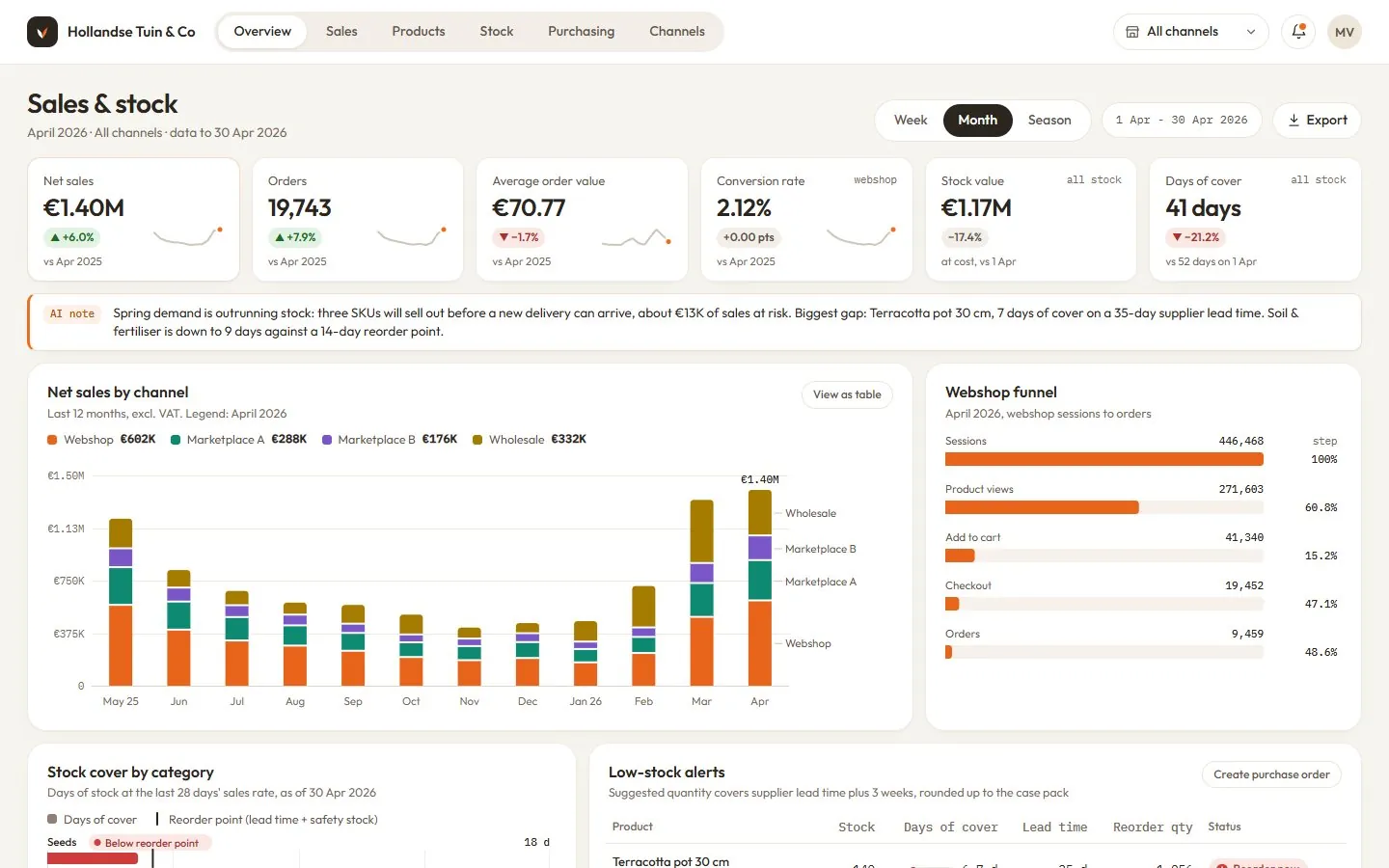 A concept inventory dashboard for a fictional e-commerce business, built on sample data.
Every Monday someone exports from three systems, pastes everything into the master file and fixes the formulas that broke.
Our reporting has grown into a chain of Excel files that depend on each other, and only one person knows the order to open them in.
We've sent management figures that were off because a range didn't stretch to cover the new rows.
A starting point, never a fixed package: describe how you want it and I build it to match.
Most manual Excel reports follow the same pattern. Data comes out of an ERP, a webshop or a bank portal as an export, gets pasted into a tab, and a set of formulas turns it into the report. Automating that rarely means throwing the workbook away. In most cases I replace the paste step with Power Query, which reads the export (or a folder full of them), applies the same cleaning steps every time and loads the result into a table. The report sheets stay where they are.
Where VBA macros already exist, I check whether they still run reliably. Macros don't work in Excel for the web and are hard for the next person to maintain, so I usually move the logic into Power Query or Office Scripts unless there's a good reason to keep it. When the file lives in SharePoint, Power Automate can then refresh it and send it out on a schedule.
Excel is the right home for a report when a small group uses it, the logic changes often, or readers want to filter and add their own notes. It gets uncomfortable once the files run to hundreds of thousands of rows, when several people need the same numbers at the same time, or when the workbook has quietly turned into an app with forms and status columns. At that point a Power BI report or a small web dashboard is usually cheaper to keep running. I'll tell you which side of that line you're on before you pay for anything. Sometimes the answer is both: Power Query keeps feeding the team's working files in Excel while a Power BI report gives management the summary.
If you hire an Excel expert through a marketplace, you often get someone who fixes the formula you pointed at and leaves the process around it as it was. I start from the steps a person takes each week and remove them. That's also why I write the run guide: the workbook should keep working after I've gone.
Send the workbook, a few sample exports and a note on the steps you take today. Dummy data is fine if the real numbers are sensitive.
I map the manual steps, tell you which ones can go, and send a fixed price.
I automate it and run it against last month's files so we can compare totals with the version you produced by hand.
You get the new workbook and the run guide, and I walk whoever owns it through a refresh.
€250 covers automating one existing report fed by a few source files; more sources, chains of linked workbooks and scheduled delivery by email or SharePoint add to the quote.
Verified reviews from real projects, 4.9 on average from 80+ reviews.
“Since I don't have a technical background, getting set up was initially challenging, but Flippie guided me through it with patience and clarity. Highly recommended!”
“I've become a regular customer by now, and the communication is always excellent with outstanding results. He thinks along proactively and asks the right critical questions.”
“Flippie delivered a clear and well-structured Power BI dashboard, translating our requirements quickly into a user-friendly solution. Communication was smooth and the collaboration very efficient.”
Anything else? Ask me directly, I reply within a few hours on working days.
Excel automation means letting Excel do the repetitive steps of a report for you: importing exports, cleaning them, updating the calculations and, if you like, sending the result. The main tools are Power Query for loading and cleaning data, tables and the Data Model for calculations, and Office Scripts or Power Automate for scheduling. The person who used to spend a morning on it clicks Refresh instead.
Excel automation for one existing report starts at €250 when it's fed by a few source files and the logic is reasonably clear. The price rises with the number of sources, chains of linked workbooks, messy exports that need a lot of cleaning, and scheduled delivery by email. You get a fixed quote after I've seen the file, so you know the cost before any work starts.
An Excel consultant fits the automation to your exports, your terminology and your layout, which a downloaded template can't know about. Templates assume clean data in a fixed shape. Real exports have extra header rows, changing column names and dates stored as text, and that is where most of my time goes. You end up with your own report, working the way it did before, minus the manual steps.
Yes. The automated workbook is still a normal Excel file, and your team can keep adding sheets, notes and formulas. I keep the Power Query steps named and in order so anyone curious can follow them, and the run guide explains which parts are safe to change. I avoid locked sheets and hidden tricks, because the next person who maintains it shouldn't need me.
Only when there's a good reason. Most of what older macros did, such as importing files, cleaning columns and combining sheets, Power Query now does more reliably and without security warnings. Macros also don't run in Excel for the web. If your process depends on an existing macro that works, I can keep it and tidy it up rather than rewrite it for the sake of it.
Yes, as closely as Excel allows. The scope on this page is a starting point, not a fixed package. Tell me how the report should look and what it should do in your own words, and I'll match your layout, your terminology and your steps. If part of the request would be fragile in Excel, I'll say so and suggest the nearest version that will hold up.
Yes, if the file lives in SharePoint or OneDrive. Power Automate can trigger an Office Script that refreshes the workbook on a schedule and then emails it, or a PDF of it, to a list of people. Files kept on a local drive are harder to schedule, since something has to open them, so moving the file to SharePoint is usually part of that setup.
A copy of the current workbook, two or three recent source exports and a short description of the steps someone takes today. If the numbers are confidential, I'm EU-based and GDPR applies, an NDA and a DPA are available on request, or you can send the same files with dummy figures. Clients in the US can send everything at the end of their day and find questions or a plan waiting in the morning.
My Power BI consulting services cover the whole job for B2B teams in the US and Europe: the data model, the DAX, the report design and the handover.
from €300 · Learn more AI automationAutomated reporting with AI commentary, built around your numbersI build automated reporting that puts your monthly or weekly pack together on its own: figures pulled from your systems, checked, charted and sent with a short commentary drafted by AI.
from €1,500 · Learn more AI automationInvoice processing automation that ends the copy-typingI build invoice processing automation that reads your supplier invoices, receipts and statements, pulls out the fields you need and puts them into a clean table or your accounting system.
Custom quote · Learn more